
Intelligent case preparation
Our AI powered workspace enhances your case preparation, with intelligent search tools, speech-to-text transcription and AI analysis of your evidence portfolio.
.webp)





















Prepare for your hearing with confidence
TrialView provides a state-of-the-art workspace to help you prepare for your hearing quickly and easily, and stay ahead of the competition.
How do we work?
Utilise smart AI capabilities
Prepare for your hearing with TrialView's enhanced AI and analytics tools.
Automatically mark up, tag and link key evidence and identify areas for strategic advantage. Then collaborate and share these insights across your team.


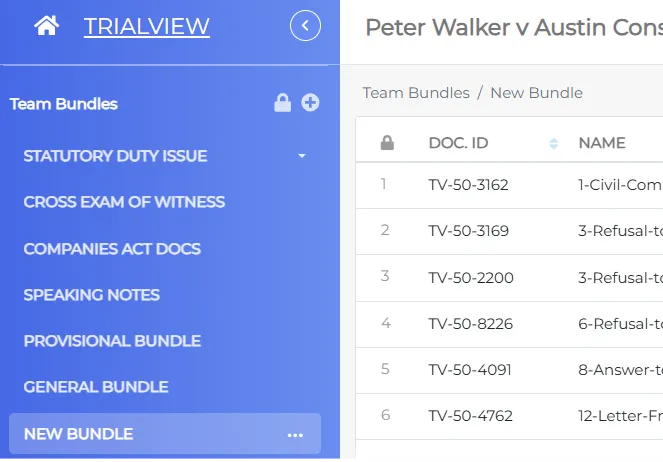
Use TrialView's tools to find key information
Harness the power of our Intelligent Search tool - ask a question and it will find the answer across your evidence portfolio.
Compare statements, depositions and communications, and search for inconsistencies in witness evidence to enhance your legal strategy.
Draft witness statements with ease
Witness statement preparation is automated with TrialView. Record the interview, generate an automated transcript and covert to a hyperlinked witness statement.
Store the statement in your workspace, include it in your bundle, and use the smart search tool to find and compare information in it, even while you're in court.
Build a timeline with AI insights
Build accurate case timelines based on AI insights and prepare for trial with auto-generated speaking notes based on critical issues identified by the team.
Stay ahead of your competition and plan your legal strategy with accuracy.
Where is TrialView used?
TrialView uses its intelligent technology and the latest AI capabilities to enhance our clients' dispute resolution around the world.
Find out more
Litigation
Used by courts around the world, TrialView's streamlined platform provides a seamless transition from bundle preparation all the way through to trial.

ADR
Use TrialView for arbitration, adjudication and mediation. Our support team can then work with you to align your current workflows and processes for a streamlined experience

Arbitration
As a trusted provider at the ICC, IAC, DDRC and other leading arbitral institutions, we offer a connected hearing service for domestic and international arbitrations.

Tribunals
TrialView is frequently used for large investigations, regulatory hearings and high-profile statutory inquiries. It brings all parties together in a secure and cohesive workspace.
Explore our case studies
See what our customers have to say about working with TrialView...

Streamlining the Landmark NMC Health Litigation with TrialView

Keidan Harrison Delivers Seamless Multi-Jurisdictional Arbitration with TrialView

Quinn Emanuel Secures Victory with TrialView AI in $335 Million Fraud Claim

Acuity Law Gains Strategic Edge with TrialView in Shareholder Dispute
FAQs about TrialView case preparation
Transform your disputes practice with TrialView’s AI-powered case preparation software.
Designed for modern legal teams, our workspace streamlines your case by implementing intelligent search tools, automated transcription, and hyperlinked witness statements. TrialView ensures that every piece of evidence is indexed, searchable, and strategically mapped, giving you a decisive edge in the courtroom.
How does TrialView’s "Intelligent Search" differ from standard keyword searching?
It does not just rely on direct keyword matching, and unlike other tools, TrialView uses your whole portfolio to find you the answer, rather than limiting itself to certain documents.
Can TrialView’s AI automatically generate case timelines?
How do I create a hyperlinked witness statement in TrialView?
Can I compare different witness depositions for inconsistencies?
Is my case data secure during the preparation phase?
Can I collaborate with external counsel or experts during case prep?
See TrialView in action
As one of the leading litigation platforms, TrialView is the perfect addition to your tech stack. Book a free demo to get started.
Book a demo